New Guide: Sign Your Media with Your Own Verified Identity
Proofmode for Android now supports Creator Assertions (CAWG) certificates. Our new step-by-step guide shows you how to get one and add it to the app.
 Fabiola
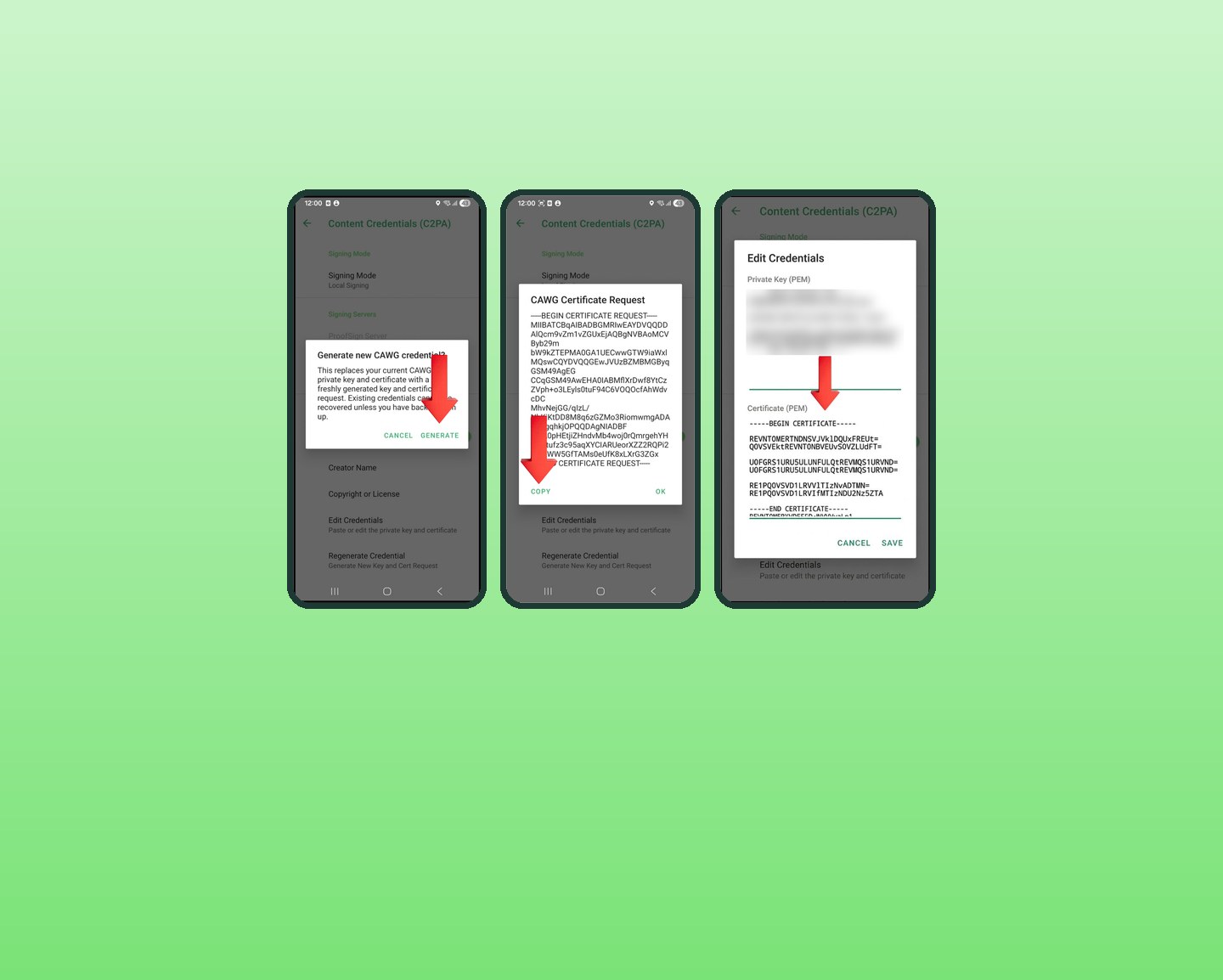
C2PA Content Credentials have always been able to answer “what”: they seal a photo or video in a tamper-evident manifest the moment it is captured. With the latest release of Proofmode for Android, your media can now also answer “who”.
Proofmode now supports Creator Assertions Working Group (CAWG) identity certificates. Once you add a CAWG certificate to the app, every photo and video you capture is signed with your own verified identity, alongside the C2PA signature that protects the media from tampering.
Why it matters
These are real situations from people using Proofmode today:
- A photojournalist wants to prove they captured an image, and own its copyright, before sending it to an agency.
- An actor recording an audition wants to embed a “No AI allowed” flag in the video file.
- A delivery program needs signed photo evidence that food reached a school, captured by verified staff members.
Each of these needs a verifiable link between a real, identity-checked person and the media they capture. That is exactly what a CAWG certificate provides.
What the guide covers
Getting a CAWG certificate means going through identity verification with a certificate provider, so we wrote a step-by-step guide with screenshots for the whole process:
- Buying a CAWG Individual Validation certificate from SSL.com (about USD $50 at the time of writing)
- Completing identity verification, with tips to get it right the first time
- What to do if the automated check rejects your submission
- The live verification call
- Generating your key in Proofmode, getting your certificate signed, and adding it back to the app
Your private key is generated and stays on your device. Only the certificate request, which contains your public key, is shared with the certificate provider.
You can always find the guide, along with our other documentation, on our Links page. If you get stuck, get in touch. We’re happy to help.
More News
See more-
Proofmode is now a Trusted Camera on RealReel
Photos and videos captured with Proofmode can now be posted on RealReel, a social platform built only for media that is verifiably real. Two separate apps, one open standard.
 c2papartnersinteroperabilityOct 28, 2026Proofmode is now a Trusted Camera on RealReel
 -
New Whitepaper: Enhancing Visual Trust in Messaging Apps
How we brought Proofmode and C2PA Content Credentials into a secure messenger, so people can see what is known about the media they receive, and what isn't.
c2pamessagingresearch -
Before the fog lifted: a verified walk up Fløyen
Nine files from one morning climb above Bergen. Every one of them carries its own paper trail, and we opened each to read it.
c2paverificationbaselineSep 22, 2026Before the fog lifted: a verified walk up Fløyen
Build with Proofmode
Check out our open- source library. We offer free and commercial licenses, as well as integration services.
We offer integration services
Need assistance integrating our code into your software or app? Our team of experienced, reliable developers are ready to help.